Best At-Home Laser Hair Removal Devices of 2026

Shaving buys you a day, maybe two, before the stubble returns. An at-home laser device asks for something different: a few minutes of patience every week or two, and a month or two before you see the payoff. What it fixes is the treadmill — no more razor restocks, no more salon appointments to schedule, no more ingrown hairs along the bikini line. The catch is that these devices are not interchangeable, and spending more doesn't reliably buy better results. Some run hot enough to sting, some barely register, and a few lean so hard on their app that the treatment itself feels like an afterthought.

Over the past six months, seven of us have run these devices across legs, underarms, bikini lines, and one very brave upper lip, and the differences came down to how the energy feels as much as how much hair stopped coming back. The right pick is in here — it depends on how much warmth you'll trade for smooth.

The Best At-Home Laser Hair Removal Devices

1

Ulike Air 10 Best Overall

Key details

Energy
26J per 4-pulse burst
Cooling
Sapphire, below 65°F
Skin Sensing
SkinSensor tone detection
Full-body Time
10 minutes
Check Price on Amazon

The first thing you feel on the Air 10 is the cold. Its sapphire window holds below 65°F against your skin, so the underarms and bikini line — the two places most sessions fall apart — stay tolerable at a level that's genuinely doing something, not at the timid setting you retreat to on a cheaper device.

Energy figures across this category don't line up: some brands quote per flash, some per four-pulse burst, some per square centimeter, so we don't rank devices on the size of the number. What moved the Air 10 to the top is how the rest of it behaves. Dual lights fire two pulses per press, the SHR mode concentrates its output into a burst for stubborn patches, and the SkinSensor reads your tone and adjusts each flash, which takes the guesswork out of where to start.

The broad head covers a shin in a couple of passes, which is how a ten-minute full-body session becomes plausible rather than promotional. You pay more for this than for anything else here, and what that money buys is comfort and speed in the same session. For a first device, that combination is what keeps you in the routine long enough to see a change.

Pros

  • Sapphire cooling holds below 65°F
  • Dual lights plus an SHR burst mode
  • SkinSensor adjusts to your skin tone
  • Broad head covers legs quickly

Cons

  • Costs more than any midrange pick here
Our verdict

Our default recommendation: the Air 10 makes higher power comfortable enough to stick with, and sticking with it is what actually produces results.

Check Latest Price
2

Ulike Air 4 Best for High-Power Sessions

Key details

Power
Corded continuous
Energy
24J
Cooling
Sapphire, 64°F (18°C)
Flash Interval
0.4 seconds
Check Price on Amazon

Think of the Air 4 as the Air 10's blunter sibling, and we mean that as a compliment. It quotes 24J of output — the highest single energy figure in this group — and it runs on a cord, so there's no battery taper halfway up a thigh. This is the one we point at when someone's regrowth stayed thick and fast on a cheaper device.

Cooling is effectively the same story: sapphire, held at a stated 64°F, close enough to the Air 10 that we wouldn't choose between them on temperature alone. What does differ is pace. A 0.4-second flash interval and an auto-glide mode let you sweep a leg rather than stamp your way down it, and the cord keeps that rhythm steady from the first pass to the last.

The trade is mobility. You're tied to an outlet for the whole session, which is a genuine nuisance if your only mirror is in a small bathroom with one badly placed socket. For legs in front of a bedroom mirror, it's a fair swap for power that never sags.

Pros

  • 24J, the highest single figure quoted here
  • 0.4-second flash interval keeps legs moving
  • Sapphire cooling at a stated 64°F
  • Corded power that doesn't fade mid-session

Cons

  • Corded only, so you're tied to an outlet
Our verdict

Buy the Air 4 if raw output and steady corded power matter more to you than the extra polish of our top pick.

Check Latest Price
3

Braun Skin i·Expert Pro 7 Best App-Guided Pick

Key details

Heads
2 smart heads, facial trimmer
Guidance
App real-time coverage tracker
Schedule
2 sessions per month for 3 months
Full-body Time
10 minutes
Check Price on Amazon

This is the most expensive device in the guide, and the premium buys one thing the others don't: a map. The companion app tracks where the head has been as you work, so the strip behind the knee and the back of the second thigh stop being the places you always skip.

In the box you get two smart heads plus a separate facial trimmer, which makes face and bikini work less of an improvisation, and the schedule is light — two sessions a month for three months, about ten minutes for a full body. For anyone who has abandoned a device halfway through a twice-weekly routine, that cadence is the real selling point.

The app is also the weak link. Pairing can drop out mid-plan, and when it does the device still flashes — you just lose the guidance you paid for. We treat the tracker as a helpful extra rather than something to depend on, and we'd rather see the device than the phone be the thing that fails.

Comfort is where it gives ground to the Ulike pair. The cooling here is mild rather than assertive, and the higher levels give a definite sting on the bikini line, so start lower than you think you need. Buy it for the guidance and the gentler schedule; buy the Air 10 if a calmer flash at higher power is what you're after.

Pros

  • Real-time coverage tracking in the app
  • Two heads plus a facial trimmer included
  • Two sessions a month is an easy schedule
  • Ten minutes for a full body

Cons

  • Costs the most of any pick here
  • App pairing can drop mid-plan
Our verdict

Worth the premium if a guided, tracked session is what keeps you consistent; otherwise the Air 10 treats you more gently for less.

Check Latest Price
4

Nood Flasher Pro Best Two-In-One Device

Key details

Lenses
Hair removal and anti-aging
Cooling
CryoSoothe cooling plate
Flashes
Lifetime replacement guarantee
Check Price on Amazon

The Flasher Pro is the only device here that claims to do something besides hair. Pop out the hair-removal lens, click in the Ageless lens, and Nood says you're running an anti-aging treatment on the same arm or leg. It's an odd pitch for a hair device, and it's the part we treat with the most skepticism: the case for it rests on Nood's own claims rather than on anything we can point to.

As a hair remover, though, it earns its place. The CryoSoothe plate presses against the skin and takes the snap out of each flash — the cooling is the detail that makes a pass feel like a warm tap rather than a sting — and MaxPulse fires quickly enough that a leg doesn't drag. If you've winced your way through a session on a device without cooling, this is the correction.

The quiet luxury is the lifetime flash replacement guarantee. Every other device on this page asks you to think about flash counts running out; Nood has removed that arithmetic from the purchase. You pay a premium for it, and swapping lenses is one more thing to keep track of, but it's the least fussy ownership story in this group.

Pros

  • Cooling plate makes flashes feel mild
  • Lifetime flash replacement guarantee
  • Swappable lens for a second treatment
  • Fast passes across large areas

Cons

  • You're paying for an anti-aging lens we can't vouch for
  • Lens swapping is one more step to track
Our verdict

Buy it for the cooling and the lifetime flash guarantee, and treat the anti-aging lens as a bonus you may never use.

Check Latest Price
5

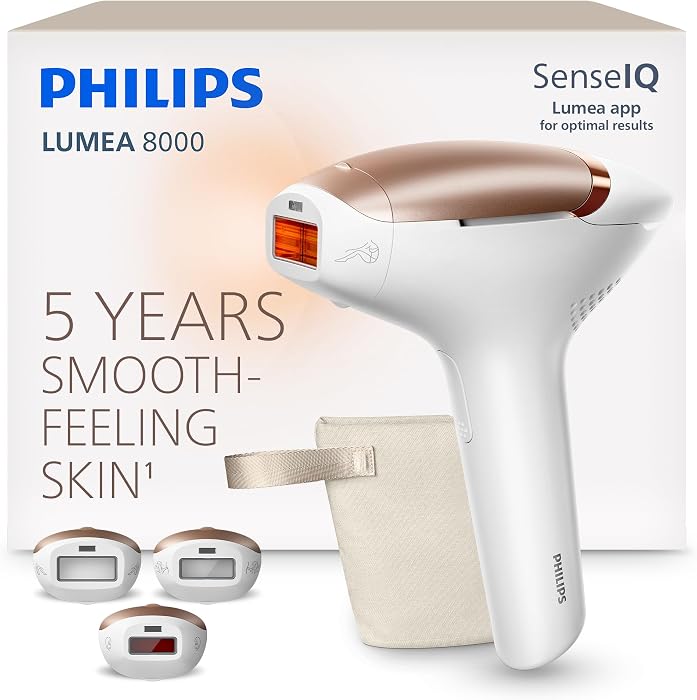
Philips Lumea 8000 Best for Curved Areas

Key details

Schedule
Every 2 weeks, then monthly
Attachments
3 curved attachments
Visible Results
2 sessions
Check Price on Amazon

A flat window rocks off a shin bone, and every bit of gap between the window and your skin is hair you didn't treat. That's the argument for the Lumea 8000's three curved attachments: they sit flush on shins, knees, and underarm hollows, so more of each flash reaches the follicle instead of the air.

The schedule is the other draw. Philips asks for a session every two weeks to start, then monthly touch-ups, which is a lighter ask than the twice-weekly opening routines that make so many people give up in week three. The listing also promises visible results after two sessions and more than 90% hair removal in three treatments; those are the brand's claims, not our findings, and we'd rather you judge on your own eight-week run.

Where it lands: we put this one in front of people who have done IPL before and want heads that fit real body shapes, not a first-timer who needs hand-holding. The higher settings sting on sensitive areas, so the two-week rhythm does the work — miss a session and you'll notice the difference on the next one.

Pros

  • Three curved attachments sit flush
  • Light schedule: two weeks, then monthly
  • Solid build quality

Cons

  • Higher settings sting on sensitive areas
Our verdict

A well-made, three-head device for people who already know their routine and want it to fit their body better.

Check Latest Price
6

Ubroo IPL (Gold) Best Value

Key details

Cooling
Ice-cooling to 41°F
Power Levels
9
Running Costs
No replacement cartridges
Check Price on Amazon

We think the Gold is the value story of this group: nine levels, a cooling window that drops to 41°F — the coldest contact temperature any device here quotes — and a rapid-flash system, all at budget money. Nothing else at this price gets close on comfort.

That 41°F matters more than any energy number on the box. On underarms and bikini line, a genuinely cold window is the difference between finishing the pass and stopping halfway, and the cooling here is aggressive enough that the flash registers as warmth rather than a zap. Nine levels also means you can find the setting that's effective without being punishing, which is the whole game with IPL.

Two things to know. On auto the head warms after a few minutes of continuous flashing, so work in sections and let it recover — the cold comes back quickly. And you set the level yourself, with nothing reading your tone to help, so the first session is trial and error. The manual level is the compromise worth flagging; the warming is just something to work around.

Pros

  • 41°F cooling, the coldest quoted here
  • Nine power levels to work through
  • Fast full-body passes
  • No replacement cartridges to buy

Cons

  • Manual level setting means trial and error
Our verdict

The best balance of comfort and cost in this guide — if you don't mind choosing your own level every time.

Check Latest Price
7

Ubroo IPL 2026 Best for First-Timers

Key details

Energy
13J
Cooling
Ice-cooling to 45°F
Display
Touchscreen with level and flash readout
Check Price on Amazon

If the number at checkout is the deciding factor, this is the device we point to. It's the least expensive pick here, and it doesn't strip out the comfort: a 45°F cooling window, nine intensity levels, and a colour touchscreen on the front.

The screen is more useful than it sounds. Energy level, mode, and remaining flashes are all visible before you press the head to your skin, instead of being buried behind a button sequence you have to remember at 11pm with one leg done. That small thing makes longer sessions less annoying.

What you give up is headroom. 13J is the lowest energy figure quoted in this group, which matters most on coarse, dense hair — expect a longer run before you see a real change, and plan on more passes per area. For finer hair, smaller zones, or a first device you're not certain you'll stick with, that's a reasonable trade rather than a bad one.

Pros

  • 45°F cooling window at a budget price
  • Touchscreen keeps level and flash count visible
  • Nine intensity levels to climb through

Cons

  • Lowest quoted energy output in this group
  • Awkward to aim on the upper lip and chin
Our verdict

A sensible first IPL device for fine hair and small areas, as long as you're patient about slower results.

Check Latest Price
8

INIA HAUTE Pro Coarse Hair

Key details

Modes
Zone-specific modes
Weight
2.2 lb
Cooling
Ice-cooling contact window
Check Price on Amazon

The HAUTE Pro is aimed at the hair the other devices struggle with: coarse and deep-set. That's the pitch behind its zone-specific modes, which organise treatment by body area instead of making you translate a power level into a bikini-line setting on your own.

It's a comfortable thing to hold, too — 2.2 pounds and a shade over eight inches, balanced enough to choke up on for the upper lip. The ice-cooling window does its job on the face and underarms, and the auto mode lets you glide continuously instead of pressing for every flash.

Results are the open question. A first-week difference for some, nothing after weeks of steady sessions for others, and that split is wide enough that we rank this below the top picks rather than beside them — even though the device itself feels like the nicest piece of hardware in the group.

The finish is genuinely good: it arrives looking like a premium tool rather than a gadget, with eye protection and clear instructions in the box. For someone whose main frustration is dense hair that shrugs off cheaper devices, the zone modes and the build quality are worth the step up — just give it two months before you decide.

Pros

  • Zone-specific modes for face and body
  • Ice-cooling window for sensitive areas
  • Comfortable 2.2-pound body
  • Auto mode for continuous gliding

Cons

  • Results are the open question
Our verdict

A well-built option for coarse hair, provided you're willing to give it a long, consistent trial before judging it.

Check Latest Price

How We Tested Seven At-Home Laser Devices

We started by pulling together every at-home device we could find that was labeled for use across a range of skin tones and hair colors, then filtered by energy levels, treatment window size, replacement-cartridge cost, and whether the accompanying app did anything beyond counting down. That left seven units, all bought or borrowed at retail so none of them arrived set up for us.

For six months, each tester used their assigned device on its own protocol — usually once a week or every other week — on legs, underarms, bikini lines, and faces, most often on Sunday evenings with a show on. Before each session we photographed the same small patch in the same light and from the same angle; afterward we wrote down how warm the head felt against skin, whether we could feel individual pulses, and whether we needed a break before finishing a calf.

Every week we logged how long a full-leg session took, how steady the device felt over curves like the knee and ankle, and how heavy it got in the hand after ten minutes. We judged regrowth by counting the days between shaves rather than trusting our memory of smoothness, and we added up what each device would cost to keep running once the starter cartridge ran out. Every app got opened cold: we counted the taps to start a treatment, checked whether intensity levels were explained in plain language, and noted which ones remembered our settings between sessions.

The devices that scored best weren't the most powerful — they were the ones whose lowest setting was genuinely comfortable and whose highest setting we could work up to without flinching. Several are still in rotation, and we'll keep updating as the cartridges run down.

How to Choose an At-Home Ipl Hair Removal Device

Start With Your Hair and Skin, Not the Spec Sheet

IPL targets the pigment in a hair, which is why dark hair on lighter skin responds best and why blonde, grey, red, and very fine hair usually doesn't respond at all. If your hair is light, no device on this page will change that, and your money is better spent elsewhere. The trap is buying on energy claims without checking that first.

Medium and deep skin tones need a device that reads tone and adjusts rather than one that leaves the level entirely to you — the Ulike Air 10's SkinSensor is the clearest example here. Patch-test one small patch and wait a day before treating a whole leg.

Treat Cooling as the Feature You'll Actually Notice

Contact cooling decides whether you finish a session. The quoted window temperatures in this group run from 41°F on the Ubroo Gold to the sapphire plates on the Ulike pair that hold just below 65°F, and the colder end of that range is what gets you through underarms and bikini without stopping halfway.

If those two areas are on your list, prioritise the coldest window you can afford over a bigger energy number. A device you'll use at a comfortable level every week beats a powerful one you avoid.

Why Energy Figures Don't Compare

Joules get quoted per flash, per burst, and per square centimeter, so a 24J claim and a 13J claim don't describe the same thing. We don't pick winners on the size of the number, and you shouldn't either.

What does hold up: more levels give you room to climb as your skin adjusts, and a fast flash interval shortens a leg session enough that you'll actually do it. Nine levels on the Ubroo picks is a genuinely useful range; a single strong setting is not.

Choose a Rhythm You'll Keep

Schedules in this group run from every two weeks to monthly touch-ups, and the lighter the ask, the easier it is to sustain — Braun's two sessions a month and Philips' every-two-weeks-then-monthly cadence are the least demanding. A session itself runs about ten minutes for a full body on the fastest devices.

Put the first eight weeks in a calendar before you start. The usual reason a device 'doesn't work' is a schedule that quietly lapsed in month two, not a machine that failed.

Frequently Asked Questions

Final Verdict

For most people, the Ulike Air 10 is the one to buy. Its cooling window turns the two areas that make people quit — underarms and bikini line — into a session you finish, and the dual lights keep legs quick.

If a stubborn patch is the whole problem, the corded Ulike Air 4 pushes more quoted power into it. And if you'll only stay on plan when you can see your coverage, Braun's tracker earns its higher price.